Good Bots, Bad Bots: How to Measure AI Referral Traffic in GA4
How to separate crawlers you don’t care about from AI tools that might actually be sending you visitors.
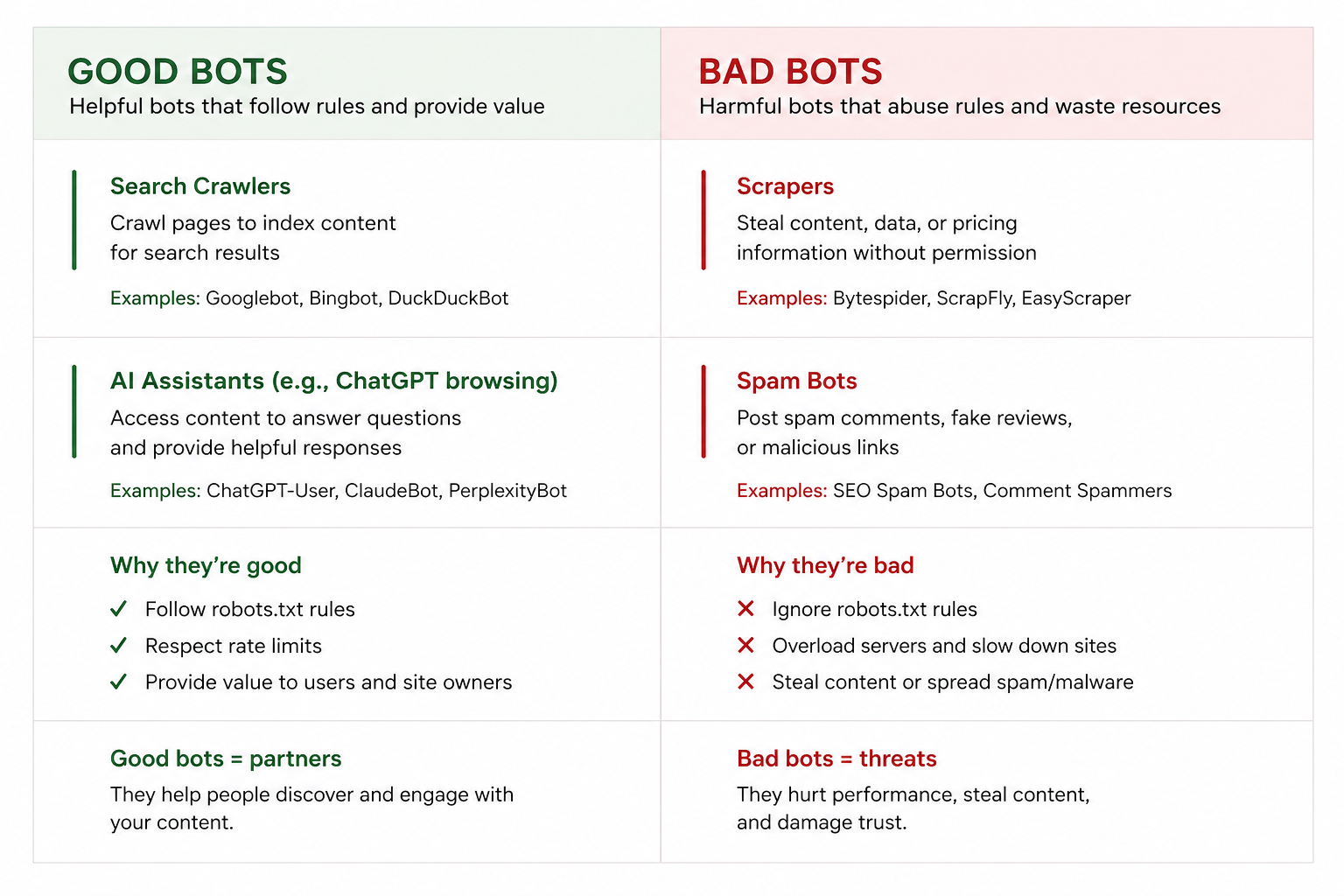
For years, the standard advice on bot traffic was pretty consistent: filter it out, keep it out of your reports, and focus on real people.
That hasn’t changed. Bots can inflate your session counts, skew engagement metrics, and make it genuinely hard to understand what’s happening on your site.
But there’s a wrinkle now.
Not every automated visitor is the same kind of problem. Some crawlers are just noise. Some scrape your content. And some, like those powering ChatGPT, Perplexity, Gemini, and similar tools, may be part of why someone found your business in the first place.
Treating all of them the same can create a blind spot.
Why GA4 Doesn’t Track AI Referral Traffic by Default
By default, GA4 doesn’t give you a clean “AI traffic” channel. Visits from AI tools tend to scatter across Referral, Direct, or Unassigned. That makes it hard to answer even basic questions:
- Are people finding us through AI tools?
- Which pages are getting surfaced?
- Does this traffic actually lead to anything?
It’s not a crisis for most small businesses right now. But it’s getting more relevant, and it’s not hard to build a cleaner view.
How to Track AI Referral Traffic in GA4
The cleanest fix is a custom channel group. Here’s the setup:
- Go to Admin → Data Display → Channel Groups in GA4
- Click Create new channel group
- Add a channel. Name it something like AI Traffic or AI Referrals
- Set the matching condition to Session source matches regex, and paste this in as a starting point:
- Place this rule above your standard Referral channel. GA4 reads rules in order — if Referral sits higher, AI traffic gets caught there first and your custom rule never runs.
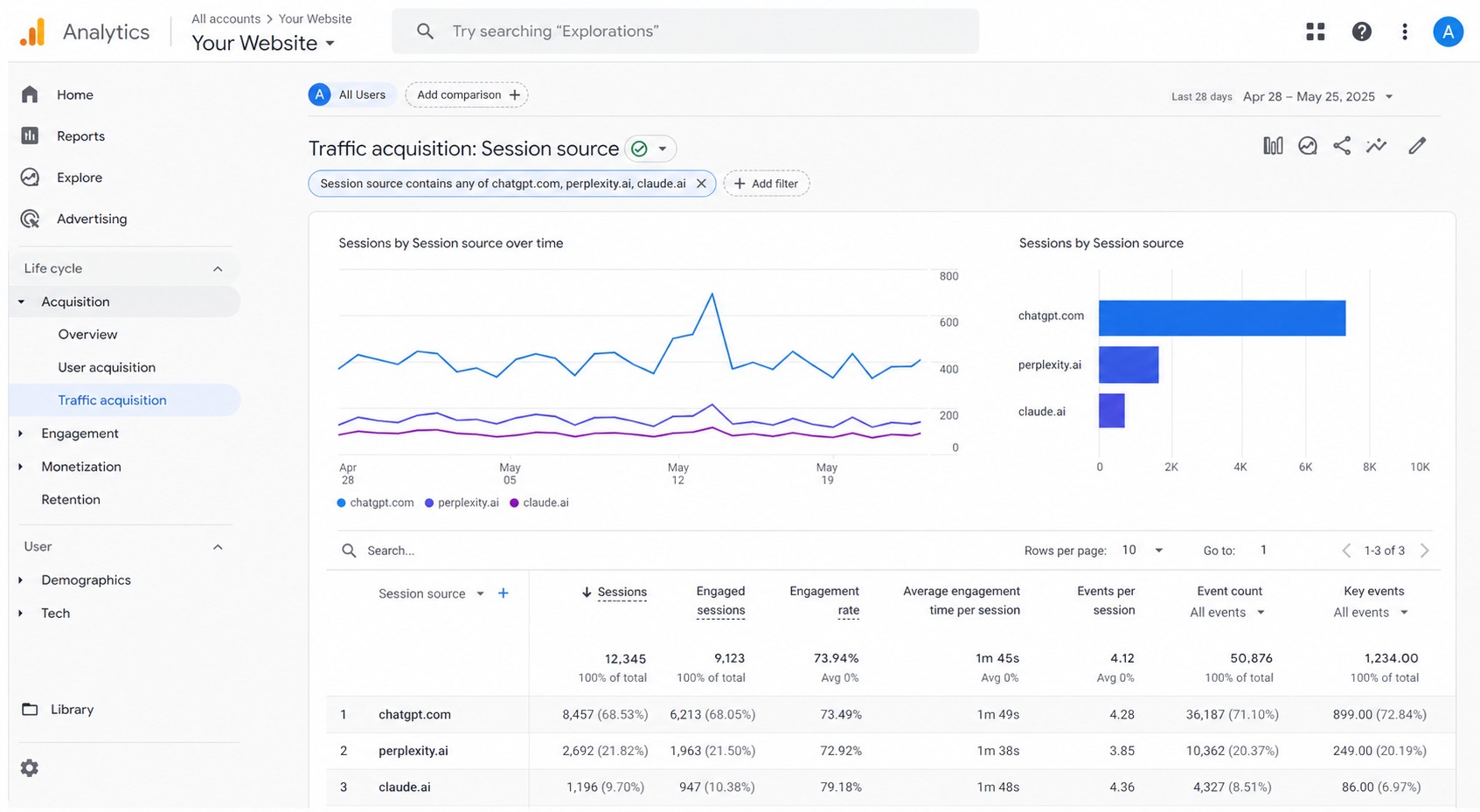
This list isn’t exhaustive and it’ll need updating over time. But it gives you something real to work with today.
What to Measure Once AI Traffic Is Separated
Sessions are the obvious place to start, but they’re not the most useful number here.
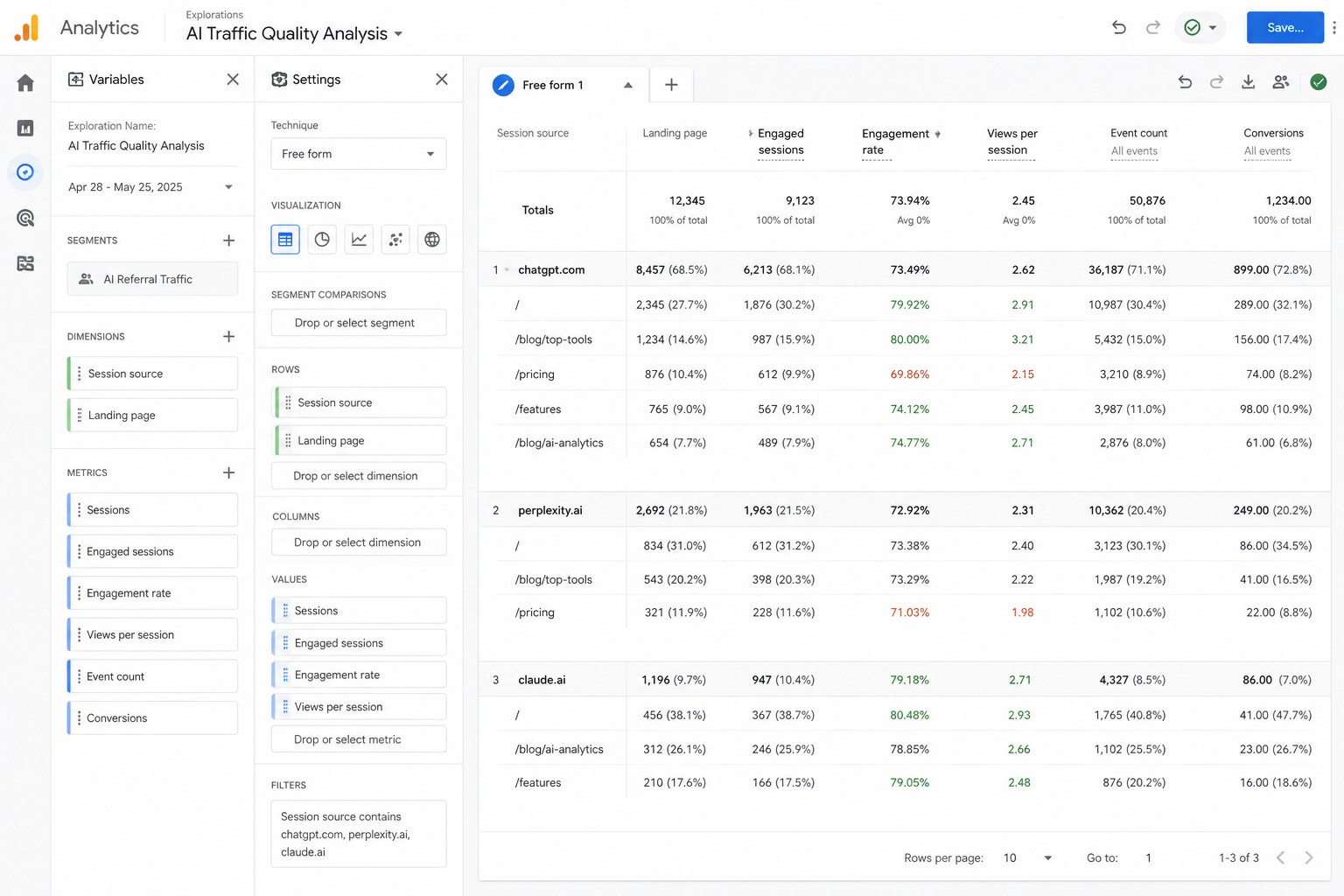
What’s more interesting is where the traffic lands. AI-assisted visits often skip the homepage entirely and go straight to a specific blog post, pricing page, comparison article, or how-to guide. Someone asked a question and got pointed to your content as part of the answer.
When you see a consistent pattern like that, it tells you which pages are being surfaced when people ask questions related to your business.
From there, look at whether those visitors go anywhere useful — do they reach your contact page, your pricing section, your signup flow? Or do they leave? That gap is usually worth closing.
What Attribution Won’t Tell You
Not all AI-assisted traffic shows up cleanly in GA4. Some visits lose referral data entirely. Some come through browsers or apps that strip tracking. Some appear as Direct with no clear source.
This isn’t a reason to dismiss the data — it just means GA4 isn’t the whole picture. If you run a lead gen site, a simple “How did you hear about us?” field fills in a lot of gaps. For ecommerce, look at landing page trends and assisted conversions alongside channel data.
Perfect attribution isn’t the goal. A clearer signal than you have today is.
How to Use AI Referral Traffic Data
Once AI traffic is isolated, a few things are worth watching:
Pages getting consistent AI referrals
Strengthen them — better internal links, clearer next steps, more complete information. If a tool is already surfacing them, make them worth landing on.
High-traffic pages with poor engagement
Usually means the page isn’t matching what the visitor expected. Better content, transparent pricing, or an FAQ section often helps more than a redesign.
Gaps in your content
If AI traffic is landing on tangentially related pages but not the thing you’d actually want visitors to find, that’s a content opportunity worth noting.
A monthly check is enough to spot trends before they become obvious.
Get a weekly GA4 brief that surfaces AI traffic trends automatically
Kulma connects to your GA4 property and sends you a weekly brief covering what actually changed: traffic shifts, referral patterns, SEO movement, conversion changes. No dashboard to log into. No starting from scratch each week.
As AI referral traffic becomes more common, the same idea applies. You don’t just want to know the number went up — you want to know if those visits landed on pages that matter, whether they converted, and whether there’s something worth acting on.
Get a weekly brief that tracks AI traffic. Try Kulma free.No credit card required · Cancel anytime
Frequently asked questions
What is AI referral traffic in GA4?
AI referral traffic refers to visits that originate from AI-powered tools like ChatGPT, Perplexity, Gemini, or Copilot. When someone uses one of those tools, sees your site mentioned or linked, and clicks through, that visit may appear in GA4 as a referral from the AI tool’s domain.
Which AI tools appear as referral sources in GA4?
The most common sources right now include perplexity.ai, chatgpt.com, gemini.google.com, copilot.microsoft.com, and various OpenAI and DeepSeek domains. This landscape is changing quickly, so the regex pattern above will need updating as new tools emerge.
Why does some AI traffic show up as Direct in GA4?
Some AI tools, browser extensions, and apps don’t pass referral data when redirecting users. The visit arrives in GA4 with no source attached, which GA4 classifies as Direct. It’s a known attribution gap — not a sign your tracking is broken.
How often should I update the regex pattern?
Check it every few months. New AI tools launch regularly, and existing tools sometimes change the domains they use. A quick look at your Referral source list for unfamiliar domains is usually enough to catch anything worth adding.
Does GA4 automatically track AI referral traffic?
Not separately. GA4 may record some AI tool visits as Referral traffic, but they’ll sit alongside every other referral source with no distinction. The custom channel group setup described in this guide is what separates them out.
Is AI referral traffic worth optimizing for?
It depends on whether it converts. Measure it first before drawing conclusions. Some businesses see high-intent visitors from AI tools that convert well; others see minimal volume that isn’t worth prioritizing. The data tells you which situation you’re in.
Final thoughts
Blocking bad traffic still matters. But a broad “block everything” approach can hide useful referral sources inside the noise.
The practical path: build a separate channel for AI traffic, watch whether it sends real visitors, look at the pages it touches, and decide whether there’s something worth acting on.
Related guides: How to reduce bot traffic in GA4 · How to fix self-referrals in GA4.