How to Reduce Bot Traffic in GA4
Bot traffic can make your Google Analytics 4 data impossible to trust, inflating sessions, distorting conversion rates, and masking what real customers are actually doing. Here's how to fix it, step by step, without a technical background.
You open Google Analytics 4 and something looks off. Traffic is up, but your phone isn't ringing. Enquiries are flat. The numbers feel wrong.
Bot traffic could be the reason. It can inflate sessions, trigger fake events, distort conversion rates, and make it nearly impossible to tell what real customers are actually doing on your site.
For small business owners, that matters more than most people realise. Bad data leads to bad decisions. You might double down on a campaign that isn't working, or miss a real problem because fake traffic is masking it.
You don't need a technical background to improve things. A few targeted changes can significantly reduce bot and spam traffic in GA4 and make your reporting more reliable.
What bot traffic in GA4 usually looks like
Bot traffic is any non-human traffic that reaches your site or sends data into Google Analytics. Some bots are harmless, like legitimate search engine crawlers. Others cause real problems: scraping content, spamming forms, triggering fake pageviews, or sending junk events that pollute your reports.
Two specific types are worth knowing by name. Referral spam is fake traffic that appears to come from external websites. Your referral channel numbers inflate and you start seeing traffic from sites you've never heard of. Ghost traffic never visits your site at all — it's data sent directly into your analytics account, bypassing your website entirely.
Common warning signs include:
- sudden traffic spikes with no matching business reason
- a surge in direct traffic to a single page
- very low engagement from a traffic source that suddenly grew
- strange hostnames or landing pages showing up in your reports
- form submissions that are clearly fake or low quality
- traffic concentrated in one country, one browser, or one path
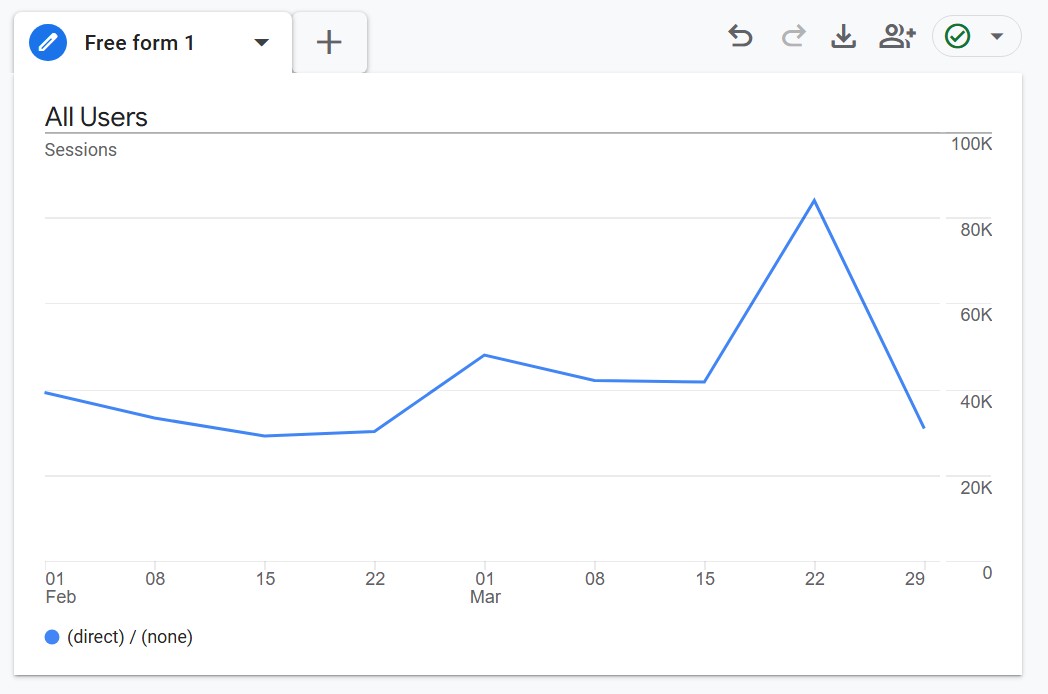
For example, if you run a local service business and your referral traffic doubled overnight but enquiries didn't move, that's a sign something's off. Real customers don't behave that way.
Does GA4 already filter bots?
Yes, but only to a point.
Google Analytics 4 automatically filters some known bots and spiders. That helps, but it's not a complete solution. It doesn't give you much visibility into what was excluded, and it doesn't reliably catch every case of spammy, low-quality, or suspicious traffic — including referral spam and ghost traffic.
Many small businesses still see inflated or messy data in GA4 even when their tracking setup is technically correct. Google gives you a baseline, but you need a few extra layers for consistently clean reporting.
How to tell if bot traffic is actually affecting you
Before making any changes, it's worth confirming that bot traffic is genuinely a problem for your property — not just a one-off spike. A few quick checks inside GA4 will tell you a lot.
- Hostname by sessions: are sessions coming from your actual website, or from domains you don't recognise?
- Engaged sessions vs total sessions: a source with hundreds of sessions but near-zero engaged sessions is almost certainly not real traffic.
- Landing page by sessions: one page receiving a disproportionate share of sessions, especially with low engagement, is a common bot pattern.
- Key events by traffic source: if conversions are concentrated in one unexpected channel with low engagement everywhere else, treat that as suspicious.
If any of these checks surfaces something that doesn't match real business activity, the steps below are worth working through.
The best ways to reduce bot traffic in GA4
1. Use hostname checks to reduce ghost spam
Ghost spam bypasses your website entirely. Spammers send fake hits straight to Google’s collection servers using your G- Measurement ID, which means server-side tools like firewalls can’t stop it on their own.
The most practical defense is checking hostname quality. Real traffic should mostly come from your own domain and valid subdomains. Ghost spam often shows up with hostnames such as (not set) or unrelated domains.
Start by auditing hostnames in GA4 so you know what “good” looks like for your property. Then tighten data collection and reporting:
- In Google Tag Manager (recommended): fire your GA4 Configuration tag only when the built-in Page Hostname matches your approved domain pattern.
- In GA4 reporting: use Comparisons or Segments that include only your legitimate hostname(s), so ghost hits are excluded from analysis views.
GA4 does not offer the same simple hostname include filter flow that many people remember from Universal Analytics, so this two-layer approach is usually the most reliable option.
2. Review unwanted referrals
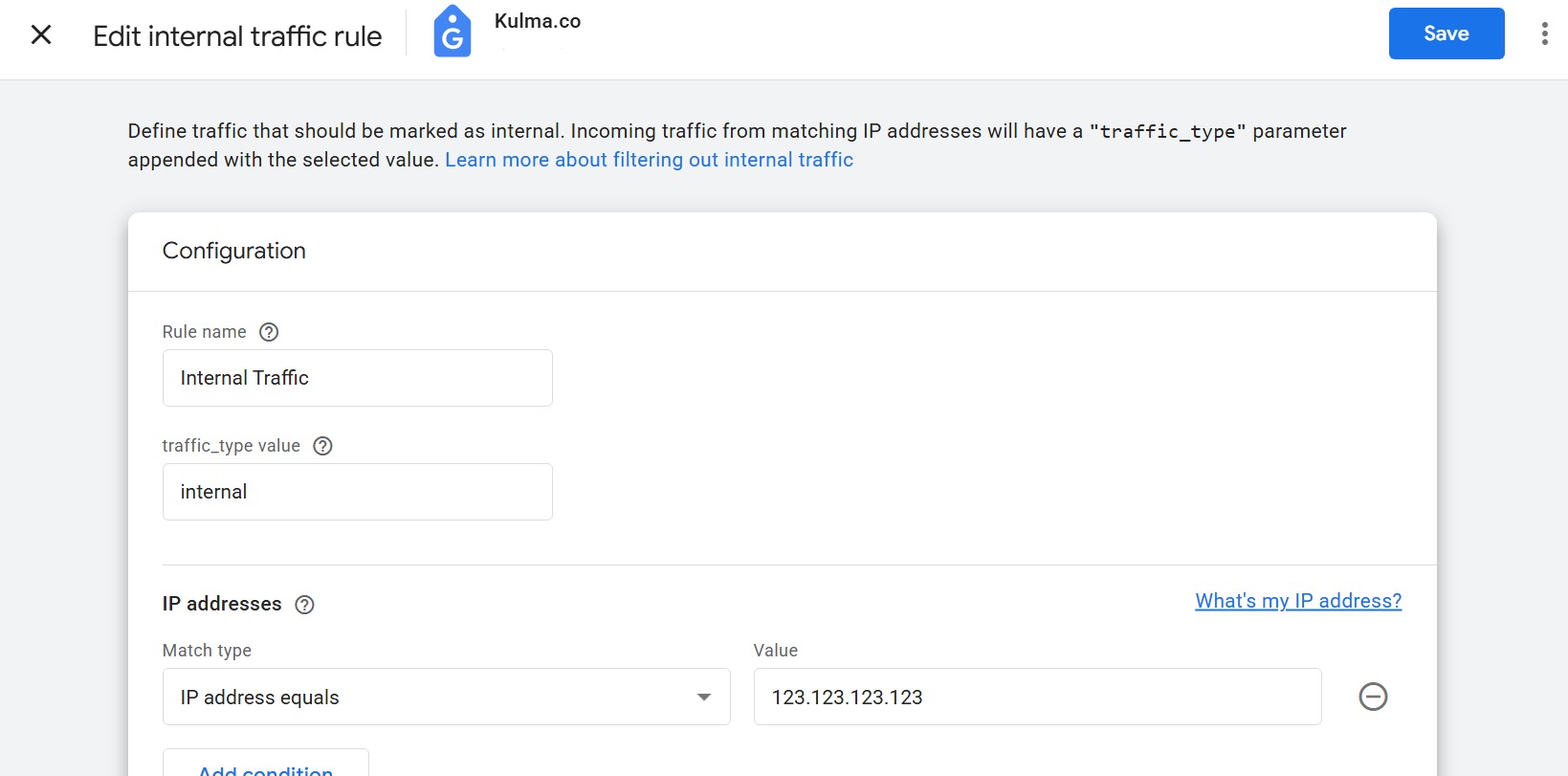
Payment providers, login tools, and third-party platforms can show up as referral sources when they redirect users mid-session. This step stops that from happening, though it doesn’t directly block bot traffic by hostname.
If PayPal, Stripe, your own domain, or another checkout tool is showing up as a referral source, read our guide to fixing self-referrals and unwanted referrals in GA4.
If Stripe, PayPal, your booking platform, or any tool that redirects back to your site mid-session is showing up in your referrals, adding it here fixes the attribution and gives you a much cleaner picture of where real visitors are actually coming from.
3. Turn off enhanced measurement events you don't use
GA4 automatically tracks outbound clicks, site search, file downloads, video plays, and form interactions. Every one of these is something bots can inflate. If you're not actively using a category in your reporting, turning it off removes a source of noise.
For most small businesses, scroll tracking, outbound clicks, and file downloads can be safely turned off unless you specifically analyse them.
4. Protect high-risk pages with Cloudflare or a similar tool
A WAF or CDN like Cloudflare sits in front of your website and filters suspicious requests before they reach your site or create GA4 data. For volume-based problems like form spam, login abuse, and site scraping, this is the most effective fix. Even the free Cloudflare plan includes meaningful bot protection. Start with:
- Bot Fight Mode (Security → Bots): challenges known bots automatically
- Rate limiting on your most-abused paths (contact forms, login, site search)
- Managed challenges rather than hard blocks to start, which is less disruptive to real users
5. Add reCAPTCHA or similar protection to high-value forms
If the main problem is fake leads or spam submissions showing up as conversions, protecting the form is more effective than cleaning up the reporting afterward.
Google reCAPTCHA v3 is invisible to real users and stops the majority of automated form spam. Add it to lead forms, contact forms, and signup pages. It's especially worth doing if fake conversions are distorting what looks like your best-performing campaigns, since cleaning that up often changes how you read your paid traffic entirely.
How to know if it worked
After making changes, give it one to two full weeks before drawing conclusions. Traffic patterns need time to stabilise.
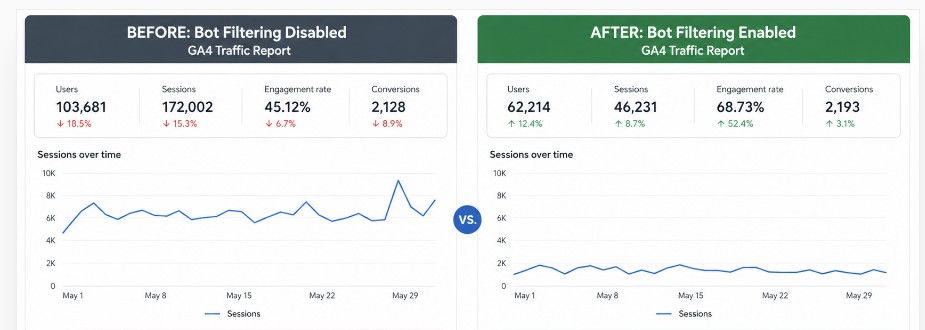
Then run the same checks you did at the start: engaged session ratios, hostname breakdown, and whether traffic levels now correlate more closely with real business activity. If overall session counts dropped but your engagement rate improved, that's the right outcome. You didn't lose real visitors. You removed noise.
What not to do
Avoid making several changes at once. If something breaks, you need to know which change caused it. Don't block aggressively before testing, and don't assume these changes are permanent. Bot traffic is an ongoing problem, not a one-time fix.
Get a weekly GA4 brief that flags suspicious traffic automatically
Kulma connects to your GA4 property and automatically monitors the signals covered in this article — engagement rate by source, unusual traffic spikes, patterns that don't match normal business activity. When something looks suspicious, it flags it in your weekly brief so you see it without having to go looking.
You can also tell Kulma which traffic sources matter most to your business and which to treat as noise — so your weekly brief focuses on the channels that reflect real customer interest.
Get a weekly brief that flags bot traffic — Try Kulma freeNo credit card required · Cancel anytime
Frequently asked questions
Does GA4 automatically filter bot traffic?
GA4 filters some known bots, but it's not comprehensive. Referral spam, ghost traffic, and bots that mimic real user behaviour often get through. You still need additional steps for consistently clean reporting.
What is referral spam in GA4?
Referral spam is fake traffic that appears to come from external websites. It inflates your referral channel numbers and can make it look like you're getting traffic from sites you've never heard of. It doesn't represent real visitors.
Why does GA4 show traffic spikes with no real business activity?
This is a common sign of bot traffic or referral spam. If sessions spike but enquiries, calls, or sales don't move, the traffic is almost certainly not from real customers.
How do I know if my GA4 data is reliable?
Look at the ratio of engaged sessions to total sessions for each traffic source. A very low engagement rate from a large source is a red flag. Also review the Hostname dimension: real data should come from your own domain/subdomains, while (not set) or unknown domains can indicate ghost spam. Use Comparisons or Segments to analyse only valid hostnames when needed.
Will filtering bot traffic affect my Google Ads data?
It shouldn't if set up correctly. Cleaner hostname checks plus cleaned-up referrals improve data accuracy, which tends to make campaign measurement more reliable rather than less.
How long does it take to see results after making these changes?
Most changes take effect immediately, but give it one to two weeks to see the full impact on your reports. Traffic patterns need time to stabilise, especially if you've been seeing inflated numbers for a while.
Does Kulma detect bot traffic automatically?
Kulma analyses your GA4 data each week and flags unusual traffic patterns — low engagement from a new source, sudden spikes from unfamiliar channels, or traffic that doesn't match your normal business activity. It also lets you mark specific sources as important or as noise, so your weekly brief reflects what actually matters to your business.
Final thoughts
Reducing bot traffic in GA4 isn't about chasing perfection. It's about making your reporting accurate enough to support better decisions.
The practical path is straightforward: confirm you actually have a problem, tighten what traffic should count, protect high-risk pages from abuse, and check whether it worked. Most of these steps take under an hour and require no technical expertise.
Once your data is cleaner, you'll spend less time second-guessing your reports and more time acting on what they're actually telling you. Try Kulma free if you'd rather have that clarity delivered to you each week instead of having to find it yourself.
Related guide: How to fix self-referrals and unwanted referrals in GA4.